In Part 2 of RAG, we stored the policy manual, policy_manual.txt, as focused chunks in a vector database, and retrieval started returning the right section instead of the whole document. But vector search still returns its closest guess for every query, and that guess is often close but wrong.
Ask “What is the refund window for electronics?” and it might return a chunk about shipping times, because both are loosely about “orders.” The search found something similar, not something exact.
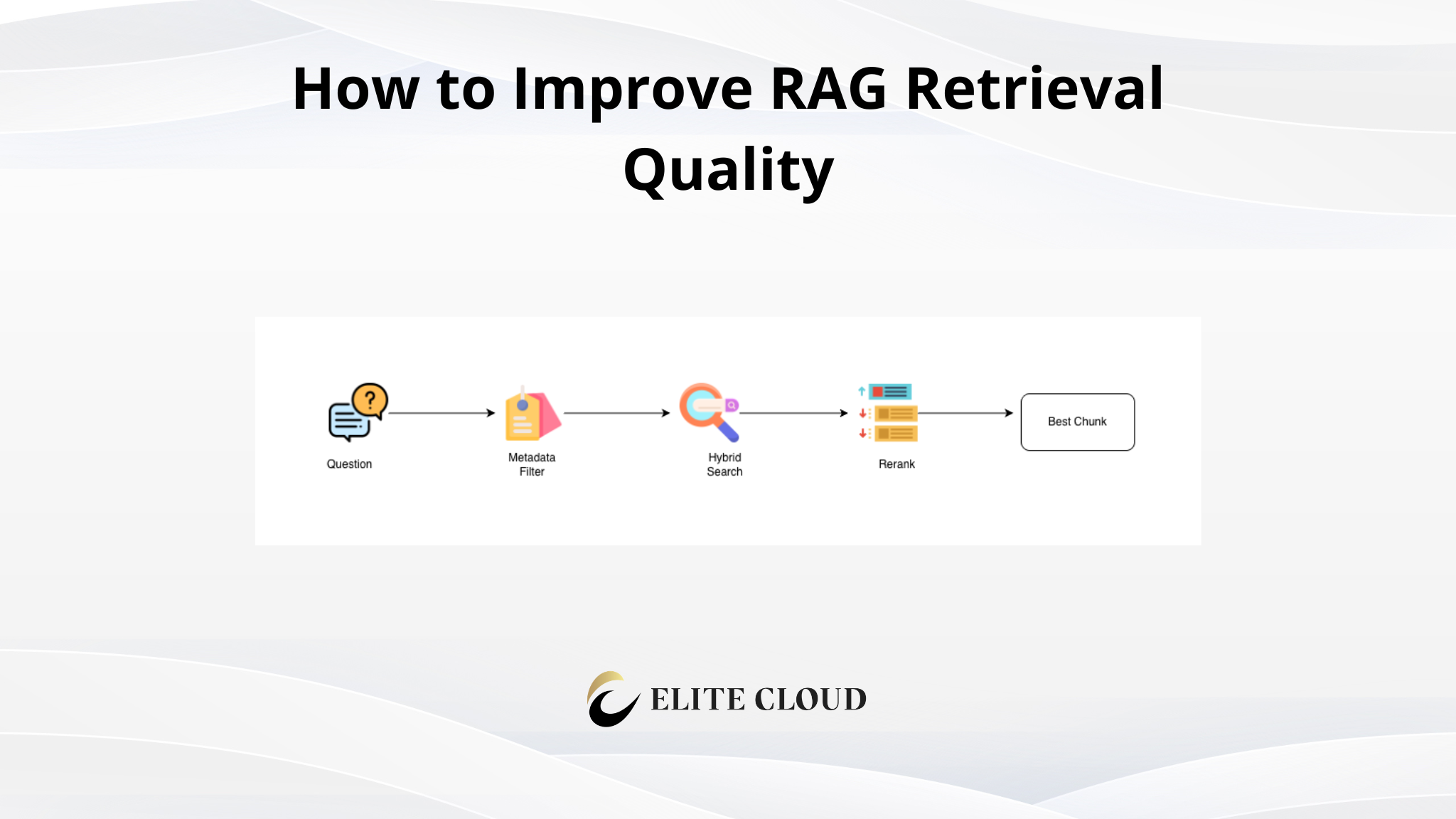
This article adds three layers that fix that: hybrid search, reranking, and metadata filtering.
What We Are Actually Doing (Architecture Overview)
We use vector search to match by meaning, but meaning alone is not always what we need. So we add three layers on top of it:
1. Hybrid search: combine keyword search (exact matches) with vector search (meaning matches).
2. Reranking: a second model reorders the merged results, putting the best one on top.
3. Metadata filtering: narrow the candidate pool by tags like topic or date before searching.
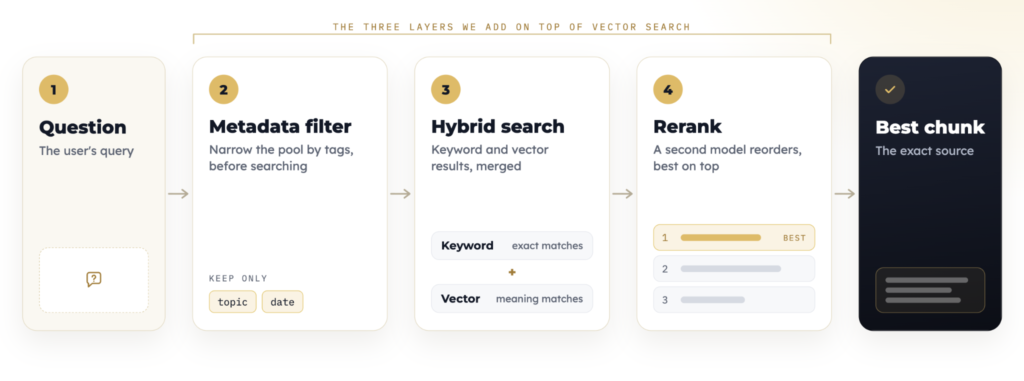
Here is what each layer does:
- Vector search is a map. It finds the neighborhood where the answer lives.
- Keyword search is a compass. It points at the exact street name you typed.
- The reranker is an editor. It reads the query and the candidates and puts the best one first.
- Metadata is the librarian. Before you search, it tells you which shelves to skip.
Prerequisites Before You Start
- The chunked Qdrant store and retrieve functions from Part 2
- The same policy manual, policy_manual.txt, from Part 2 (its Refunds, Returns, and Cancellations sections reuse “return” and “refund” wording, which is what makes the problem show up)
How the code is organized: This article modifies the rag.py file from Part 2. We define keyword_search, merge, and rerank, then upgrade retrieve to run all three layers. The embed, generate, store, and client objects come from Part 2, so you run the result the same way with python rag.py.
Step 1: Add Keyword Search (Hybrid Search)
Vector search fails on exact values like product codes, policy numbers, or names. Keyword search finds them instantly by matching words. Hybrid search runs both searches and merges the results.
First, we define a keyword_search function. store.scroll reads the stored points back out of Qdrant, so we can score their payload text by word overlap instead of by meaning:
def keyword_search(query, top_k=5):

    terms = query.lower().split()

    scored = []

    for point in store.scroll(collection_name="policy", limit=1000)[0]:

        text = point.payload["text"].lower()

        score = sum(text.count(term) for term in terms)

        if score > 0:

            scored.append((score, point))

    scored.sort(key=lambda pair: pair[0], reverse=True)

    return [point for _, point in scored[:top_k]]
Note: Scanning every point is fine for a small collection like ours. For a large one, page through scroll in batches or use Qdrant’s full-text index instead.
Then we define merge, which combines the two result lists and drops duplicates:
def merge(a, b):

    """Combine two result lists, dropping duplicate chunks (by id)."""

    seen = set()

    merged = []

    for point in a + b:

        if point.id not in seen:

            seen.add(point.id)

            merged.append(point)

    return merged
Now the hybrid search itself:
def hybrid_search(query, top_k=5):

    vector_matches = store.query_points(

        collection_name="policy",

        query=embed([query])[0],

        limit=top_k,

    ).points

    keyword_matches = keyword_search(query, top_k=top_k)

    return merge(vector_matches, keyword_matches)
Pro tip: Use hybrid search whenever your documents contain exact identifiers like SKUs, policy numbers, or names.
Step 2: Rerank the Results
After merging, we have a list of candidates. A reranker is a second pass that reads the query and each candidate, scores them for relevance, then reorders the list. The first search is fast and broad; the reranker is slower but precise, so it only looks at the short list.
def rerank(query, candidates):

    """A toy reranker that scores by word overlap. Swap in a real reranking

    model (a second pass that reads the query and each candidate) here."""

    terms = query.lower().split()

    scored = []

    for point in candidates:

        score = sum(point.payload["text"].lower().count(term) for term in terms)

        scored.append((score, point))

    scored.sort(key=lambda pair: pair[0], reverse=True)

    return [point for _, point in scored]
Note: The reranker is a second pass. It does not replace the first search. It improves precision by reordering what the first search already found.
Step 3: Filter by Metadata
Metadata is a set of labels attached to each chunk: a topic, a date, a document type. In Part 2 we stored a source label in each chunk’s payload; now we add a topic label the same way. Think of them as sticky notes on the drawer. Filtering removes chunks whose labels do not match, before ranking.
For this demo we derive a rough topic from the text; in production you would set the label yourself when you store the chunk:
for point in store.scroll(collection_name="policy", limit=1000)[0]:

    text = point.payload["text"].lower()

    topic = "refunds" if "refund" in text else "general"

    store.set_payload(

        collection_name="policy",

        payload={"topic": topic},

        points=[point.id],

    )
Then we let Qdrant filter inside the search, before it ranks anything:
from qdrant_client.models import Filter, FieldCondition, MatchValue

def search_topic(query, topic, top_k=3):

    return store.query_points(

        collection_name="policy",

        query=embed([query])[0],

        limit=top_k,

        query_filter=Filter(

            must=[FieldCondition(key="topic", match=MatchValue(value=topic))]

        ),

    ).points
Filtering is fast and precise because it removes irrelevant chunks inside the database, before any similarity ranking happens.
Upgrading `retrieve`
Now we wire the layers together into one retrieve function, replacing the Part 2 version:
def retrieve(query, top_k=10, topic=None):

    if topic:

        candidates = search_topic(query, topic, top_k=top_k)  # Step 3 (optional)

    else:

        candidates = hybrid_search(query, top_k=top_k)        # Step 1

    ranked = rerank(query, candidates)                        # Step 2

    return [point.payload["text"] for point in ranked[:3]]
The rest of rag.py stays the same, because the sample query and the Telegram bot both call retrieve. Upgrading one function upgrades everything.
The Complete Script
Here is the full rag.py: everything from Part 2 plus the three retrieval layers. Save it and run python rag.py after setting MIXROUTE_API_KEY, exactly as in Part 2. You can get your MixRoute API key from here.
import os

import re

from openai import OpenAI

from qdrant_client import QdrantClient

from qdrant_client.models import (

    Distance,

    FieldCondition,

    Filter,

    MatchValue,

    PointStruct,

    VectorParams,

)

client = OpenAI(

    api_key=os.environ["MIXROUTE_API_KEY"],

    base_url="https://api.mixroute.ai/v1",

)

EMBED_MODEL = "text-embedding-3-small"

CHAT_MODEL  = "gpt-4o-mini"

CHUNK_SIZE = 500

CHUNK_OVERLAP = 100

def embed(texts):

    resp = client.embeddings.create(model=EMBED_MODEL, input=texts)

    return [item.embedding for item in resp.data]

def chunk_text(text, chunk_size=CHUNK_SIZE, overlap=CHUNK_OVERLAP):

    text = re.sub(r"\s+", " ", text).strip()

    sentences = [s.strip() for s in re.split(r"(?<=[.!?])\s+", text) if s.strip()]

    merged = []

    for s in sentences:

        if merged and len(merged[-1]) < 15:

            merged[-1] = merged[-1] + " " + s

        else:

            merged.append(s)

    chunks, current, size = [], [], 0

    for sentence in merged:

        if current and size + len(sentence) > chunk_size:

            chunks.append(" ".join(current))

            carried, carried_size = [], 0

            for s in reversed(current):

                if carried and carried_size + len(s) >= overlap:

                    break

                carried.insert(0, s)

                carried_size += len(s) + 1

            current, size = carried, carried_size

        current.append(sentence)

        size += len(sentence) + 1

    if current:

        chunks.append(" ".join(current))

    return chunks

def generate(query, context_chunks):

    context = "\n\n".join(context_chunks)

    resp = client.chat.completions.create(

        model=CHAT_MODEL,

        messages=[

            {

                "role": "system",

                "content": "Answer using only the context provided. "

                           "If the context does not contain the answer, say so.",

            },

            {"role": "user", "content": f"Context:\n{context}\n\nQuestion: {query}"},

        ],

    )

    return resp.choices[0].message.content

store = QdrantClient(":memory:")

store.create_collection(

    collection_name="policy",

    vectors_config=VectorParams(size=1536, distance=Distance.COSINE),

)

# Step 1: hybrid search (keyword + vector)

def keyword_search(query, top_k=5):

    terms = query.lower().split()

    scored = []

    for point in store.scroll(collection_name="policy", limit=1000)[0]:

        text = point.payload["text"].lower()

        score = sum(text.count(term) for term in terms)

        if score > 0:

            scored.append((score, point))

    scored.sort(key=lambda pair: pair[0], reverse=True)

    return [point for _, point in scored[:top_k]]

def merge(a, b):

    seen = set()

    merged = []

    for point in a + b:

        if point.id not in seen:

            seen.add(point.id)

            merged.append(point)

    return merged

def hybrid_search(query, top_k=5):

    vector_matches = store.query_points(

        collection_name="policy",

        query=embed([query])[0],

        limit=top_k,

    ).points

    keyword_matches = keyword_search(query, top_k=top_k)

    return merge(vector_matches, keyword_matches)

# Step 2: rerank the merged candidates

def rerank(query, candidates):

    terms = query.lower().split()

    scored = []

    for point in candidates:

        score = sum(point.payload["text"].lower().count(term) for term in terms)

        scored.append((score, point))

    scored.sort(key=lambda pair: pair[0], reverse=True)

    return [point for _, point in scored]

# Step 3: filtered search over one topic

def search_topic(query, topic, top_k=3):

    return store.query_points(

        collection_name="policy",

        query=embed([query])[0],

        limit=top_k,

        query_filter=Filter(

            must=[FieldCondition(key="topic", match=MatchValue(value=topic))]

        ),

    ).points

def retrieve(query, top_k=10, topic=None):

    if topic:

        candidates = search_topic(query, topic, top_k=top_k)

    else:

        candidates = hybrid_search(query, top_k=top_k)

    ranked = rerank(query, candidates)

    return [point.payload["text"] for point in ranked[:3]]

with open("policy_manual.txt") as f:

    policy_manual = f.read()

chunks = chunk_text(policy_manual)

vectors = embed(chunks)

store.upsert(

    collection_name="policy",

    points=[

        PointStruct(

            id=i,

            vector=vector,

            payload={"text": chunk, "source": "policy_manual.txt"},

        )

        for i, (chunk, vector) in enumerate(zip(chunks, vectors))

    ],

)

# Step 3: tag each chunk with a topic so we can filter later

for point in store.scroll(collection_name="policy", limit=1000)[0]:

    text = point.payload["text"].lower()

    topic = "refunds" if "refund" in text else "general"

    store.set_payload(

        collection_name="policy",

        payload={"topic": topic},

        points=[point.id],

    )

question = "What is the refund window for electronics?"

print(generate(question, retrieve(question)))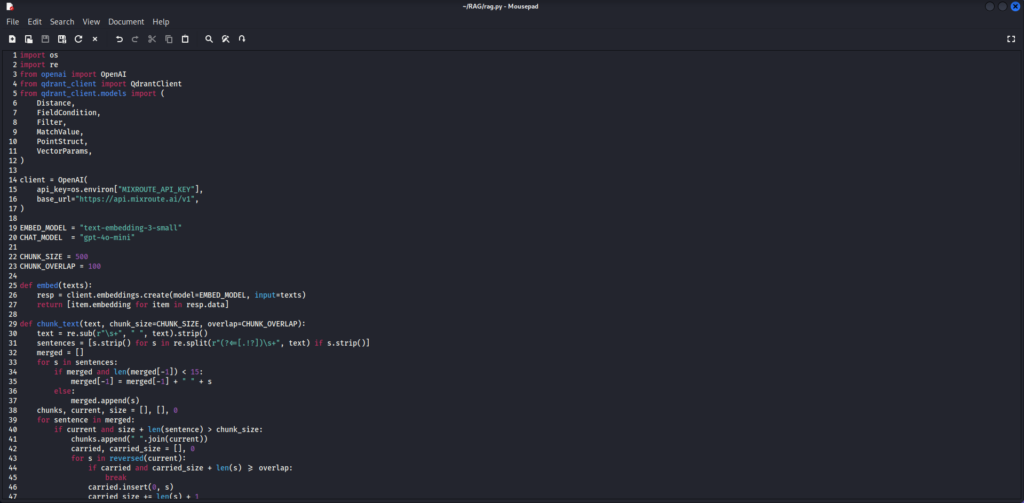

Before and After
One query, four stages:
1. Vector only: returns a related but wrong chunk (shipping times for a refund query).
2. Hybrid search: the exact-match chunk now appears.
3. Reranking: the best chunk is promoted to the top.
4. Metadata filter: irrelevant topics and dates are excluded entirely.
Each layer removes a different kind of wrong answer.
Wiring It Into the Telegram Bot
The Telegram bot from Part 2 calls retrieve, and we just upgraded retrieve, so it improves with no other change: its answer handler now gets hybrid, reranked, and filtered results automatically.
The bot code itself is unchanged from Part 2. Replace the final question and print lines in the complete script above with the block below, then run the file with both keys set:
from telegram.ext import Application, MessageHandler, filters

TOKEN = os.environ["TELEGRAM_BOT_TOKEN"]

async def answer(update, context):

    question = update.message.text

    reply = generate(question, retrieve(question))

    await update.message.reply_text(reply)

app = Application.builder().token(TOKEN).build()

app.add_handler(MessageHandler(filters.TEXT & ~filters.COMMAND, answer))

app.run_polling()

Then import the API key & Token with the below command:

export MIXROUTE_API_KEY="your-key"

export TELEGRAM_BOT_TOKEN="your-bot-token"

python rag.py
Ask the bot “How long does standard shipping take?” and it now returns the accurate chunk.
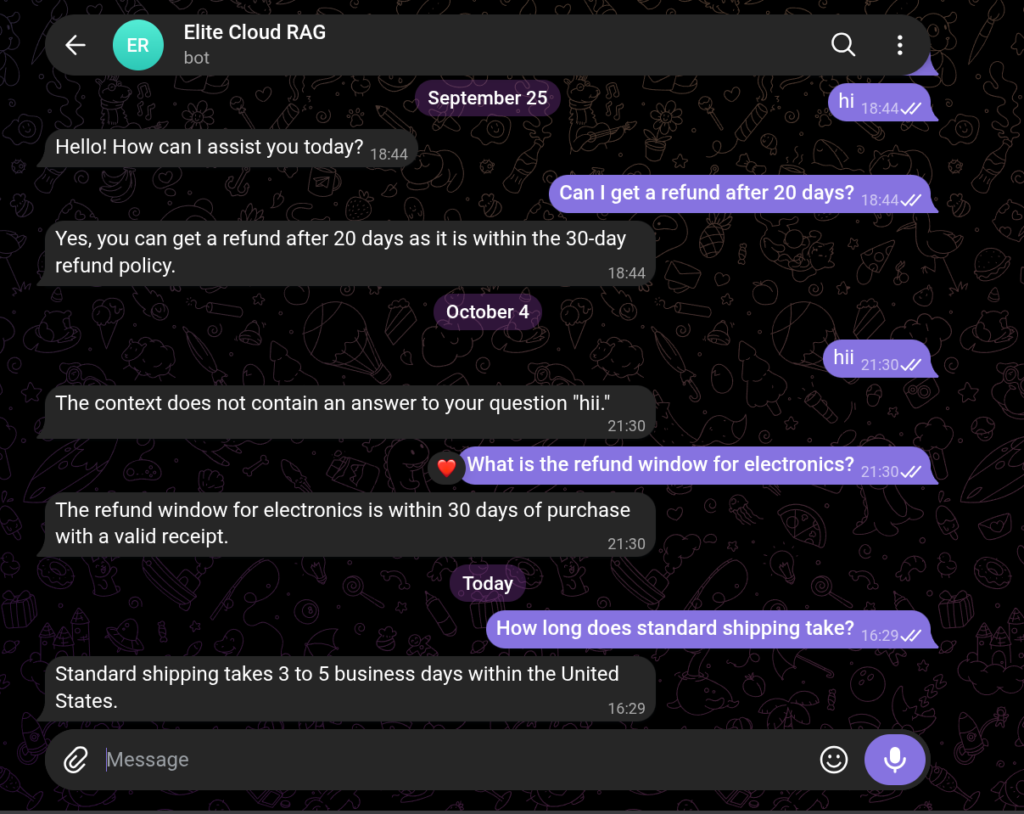
Only the retrieval inside the bot improves; the interface is identical.
Cost Considerations
- Hybrid search: keyword search is usually cheap; vector search is the main cost.
- Reranking: you pay per reranked item. Rerank only the top candidates, not everything.
- Metadata filtering: nearly free, and it reduces the cost of everything downstream.
Common Mistakes We See
1. Relying on vector search alone for exact-match queries like product codes.
2. Reranking too many candidates: rerank a small top set, not the whole database.
3. Ignoring metadata: a cheap filter often fixes retrieval better than a fancier model.
Final Thoughts
Better retrieval is only valuable if you can prove it is better and safe for real users. In the next article, we will cover evaluation and security.